How to Play NFS Underground 2 in the Browser
NFS Underground 2 Browser starts from the port's own start page in Chrome or Firefox, and a first Quick Race takes about six screens.
Verified on version Oct 31, 2026 update (November 1, 2026)
On this page
NFS Underground 2 Browser starts on the port’s own start page, nfsu2.xyz, in a current Chrome or Firefox with WebGPU. You press Play there, answer one question about online free roam, sit through the original intro, say whether you want a profile and then pick Quick Race from the main menu. We did all of this in desktop Chrome on November 1, 2026. UBG76 does not host, stream or link to the game, so this guide only describes what we saw and what the port’s start page says. For help when something fails, see the troubleshooting guide .
What do you need to run NFS Underground 2 Browser?
You need a computer with a current Chrome or Firefox that supports WebGPU. The port’s start page says it recompiles the PC game’s own code for those two browsers. The game also downloads data as it needs it, up to 1.7 GB, so a steady connection helps on the first visit. The Other tab has a button that preloads all of it at once, so loading never waits on the network . Our own test used a regular Google Chrome 149 on Linux. WebGPU ran through software rendering there, so we cannot give load times or frame rates that match a normal PC.
| Item | What the sources say |
|---|---|
| Browser | Chrome or Firefox |
| Graphics | WebGPU |
| Game data | Up to 1.7 GB, downloaded as you play |
| Cost | No price shown; a Donate button helps with hosting |
| Devices | Desktop tested by us; the port lists touch and phones |
What does the start page show?
The start page shows a Ready panel that says “Press Play to start”, with one Play button marked Enter. Under it is a live Playing now counter. During our test it ran between 9,403 and 9,633 players in total, with roughly 3,400 to 3,550 of them in free roam and 750 to 800 in races or lobbies. Tabs for Saves, Online, Friends & crews, Game, Controls and Other hold the settings, and the Game tab notes that changes apply the next time you press Play. The page also sets itself apart in its header: “Fan project. Not affiliated with or endorsed by Electronic Arts.”
What happens when you press Play?
The first thing you get is a dialog called “Free roam with others?”. It explains that your career free roam is shared, that races, traffic and money stay separate, and that everyone on the server can see your name and whether you are driving or in a menu. Players near you can see your car. The buttons are Not now and Turn on, and you can change the choice later under Online. The online free roam guide covers that mode in full.
What comes after the dialog?
After the dialog you watch the original intro, then a title screen asks you to press Enter. The intro runs the EA logos, THX, a public service clip and the opening movie. The movie loops until you click the screen once, and then Enter works. Next a popup asks “Would you like to create a new profile?” with Yes and No. You land on the main menu with Quick Race selected, plus Continue and Quit Game at the bottom. With no profile the lower left corner reads No Profile. The Game tab also has a Movies switch for the intro and story movies.
How do you run a Quick Race?
Choose Quick Race, pick a mode, pick a track, pick a car and choose a transmission. That was our exact order:
- The mode list runs Circuit, Sprint, Drag, Drift, Street X and Free Run. Free Run skips the track list and goes straight to car choice.
- Track Select shows the name, a map of the route, race type, distance and best lap. Without a profile most tracks were locked. In Circuit only Resort Loop and Outer Ring opened.
- The Circuit options screen defaulted to Forward, Lap KO Off, 3 laps, Minimum traffic, 3 opponents, Medium difficulty and Catch Up On.
- Car Select showed only 12 cars, from the Peugeot 206 to the Lancer Evolution VIII, each with bars for acceleration, top speed and handling.
- A Transmission prompt offers Manual or Auto.
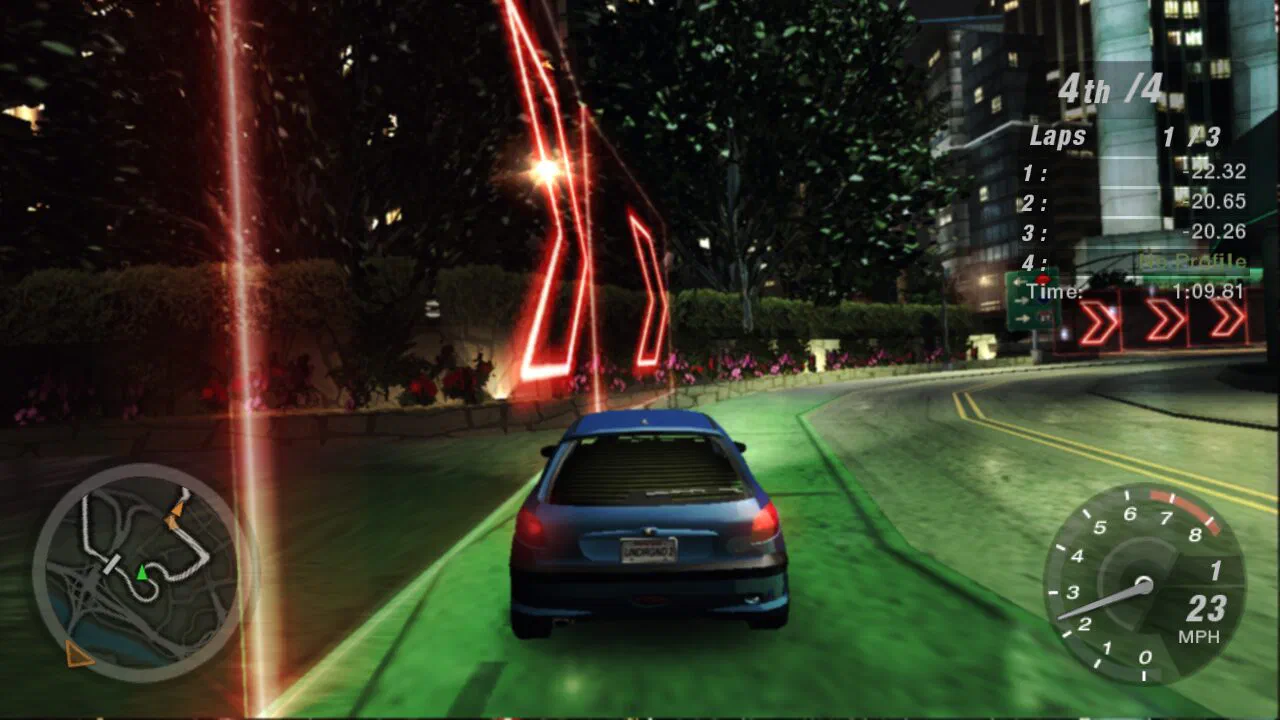
- The race starts with four drivers, three laps, a minimap in the lower left and speed in mph in the lower right.
The tracks table lists every Quick Race track and the cars table lists the 12 starter cars.
How do you save your progress?
Press Esc (or Start on a controller), go to Garage and choose Save. The start page repeats that line in its Saves tab. The Game tab also has an Autosave switch that sets each profile’s Save option to Autosave once. Our test never made a profile, so we did not test saving ourselves. The saves guide explains backups and cloud saves.
What did we not check?
We did not play career mode, see the full car list or test any unlock condition. We also did not try phones, tablets or online races. Controls are in the controls table and the controllers and touch guide .
Which wiki entries support this guide?
Use these entries to check the game facts discussed in this guide.
What else do players ask about how to play NFS underground 2 in the browser?
Do I have to create a profile to race in NFS Underground 2 Browser?
What does the Free roam with others prompt do in NFS Underground 2 Browser?
Which other guides can help you play?
5 more guides cover NFS Underground 2 Browser.
Which sources support this page?
UBG76 play test in desktop Chrome, NFS Underground 2 Browser start page, all tabs and th0mk/nfsu2-web on GitHub support this page, verified against version Oct 31, 2026 update.
- UBG76 play test in desktop Chrome November 1, 2026.
- NFS Underground 2 Browser start page, all tabs Copied on November 1, 2026; the site is not linked.
- th0mk/nfsu2-web on GitHub